
Your logo is the face of your food brand. But printing it on a cardboard box isn’t as simple as hitting “print.” The method you choose—flexographic, offset, or digital—determines not only the final look but also your minimum order quantity, per‑unit cost, and even the shelf‑life of your packaging. This guide breaks down each technique, the critical differences between CMYK and PMS, substrate compatibility, ink safety, artwork requirements, and the real‑world cost trade‑offs that matter to foodservice operators.
Food Box Logo Printing: Flexo vs Offset vs Digital Guide
Food Packaging Printing Guide
5 Ways to Print Your Logo on Food Boxes: Flexo, Offset, Digital & More
Choosing the right printing method for your food boxes can make or break your brand presentation. From high‑volume flexo to short‑run digital, this guide compares every major technique, substrate, and cost factor—so you can pick the one that fits your business.
Flexographic Printing: High‑Speed, High‑Volume Logo Production
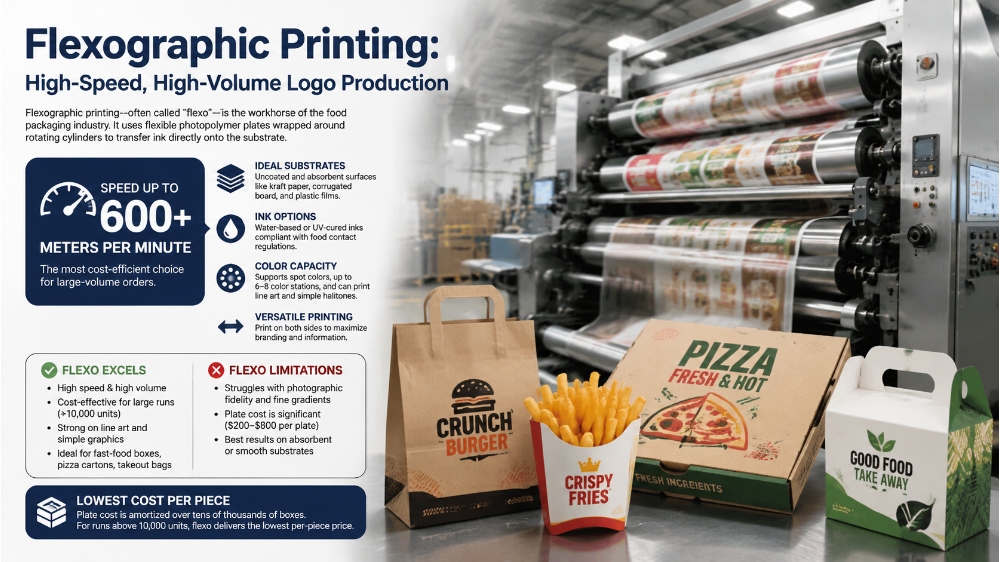
Flexographic printing—often called “flexo”—is the workhorse of the food packaging industry. It uses flexible photopolymer plates wrapped around rotating cylinders to transfer ink directly onto the substrate. A 2026 comparison by Millionpack notes that flexo presses can reach speeds of over 600 meters per minute, making them the most cost‑efficient choice for large‑volume orders.
Flexo excels on uncoated and absorbent surfaces like kraft paper, corrugated board, and even plastic films. It supports spot colors, up to 6–8 color stations, and can print both line art and simple halftones. However, it struggles with photographic fidelity and fine gradients compared to offset. The plate cost is significant (typically $200–$800 per plate), but that cost is amortized over tens of thousands of boxes. For runs above 10,000 units, flexo delivers the lowest per‑piece price.
One key advantage is the ability to print on both sides and use water‑based or UV‑cured inks that are compliant with food contact regulations. Flexo is the standard for fast‑food fry boxes, pizza cartons, and takeout bags—anywhere volume and speed outweigh ultra‑high detail.
Offset Printing: Premium Quality for Large Runs
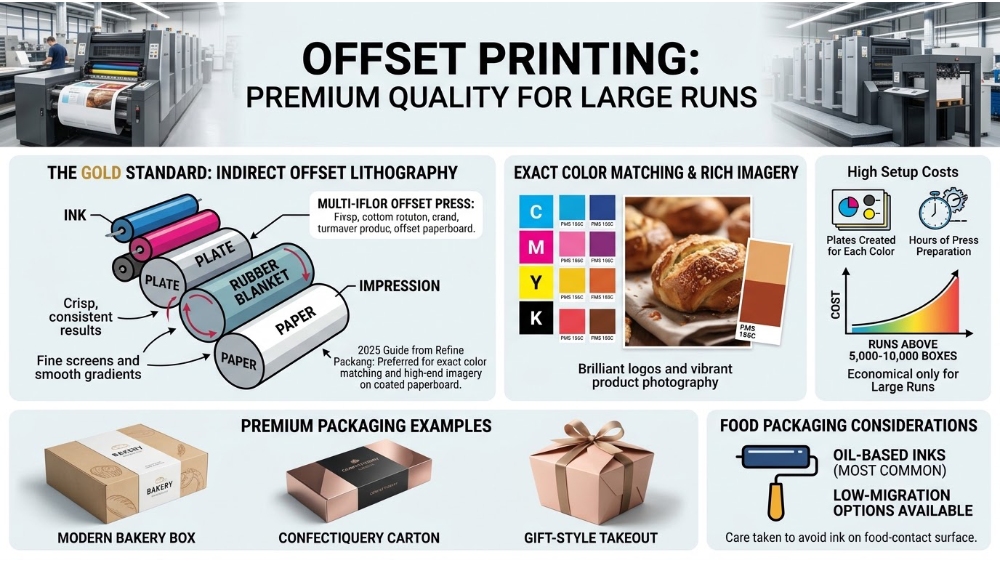
Offset lithography—commonly called “offset”—is the gold standard for sharp, photo‑realistic print quality. It works by transferring ink from a metal plate to a rubber blanket, then onto the paper. This indirect method produces crisp, consistent results with fine screens and smooth gradients. According to a 2025 guide from Refine Packaging, offset printing is the preferred choice for brands that need exact color matching and high‑end imagery on coated paperboard.
Offset is best suited for white, coated boards with a smooth surface. It can print CMYK (four‑color process) plus optional Pantone (PMS) spot colors, enabling brilliant logos and vibrant product photography. However, setup costs are high: plates must be created for each color, and press preparation takes hours. This makes offset economical only for runs above 5,000–10,000 boxes. Below that, the setup cost per unit becomes prohibitive.
For food packaging, offset is often used for premium bakery boxes, confectionery cartons, and gift‑style takeout containers where visual appeal drives purchase decisions. The ink is typically oil‑based, but low‑migration variants are available for direct food contact—though care must be taken with the design to avoid ink on the food‑contact surface.
Tip: Read Flexo vs Offset Printing for Food Boxes: Cost, Quality & Speed Guide to explore more about differences between flexo and offset printing.
Digital Printing: Short‑Run, Variable Data, Fast Turnaround
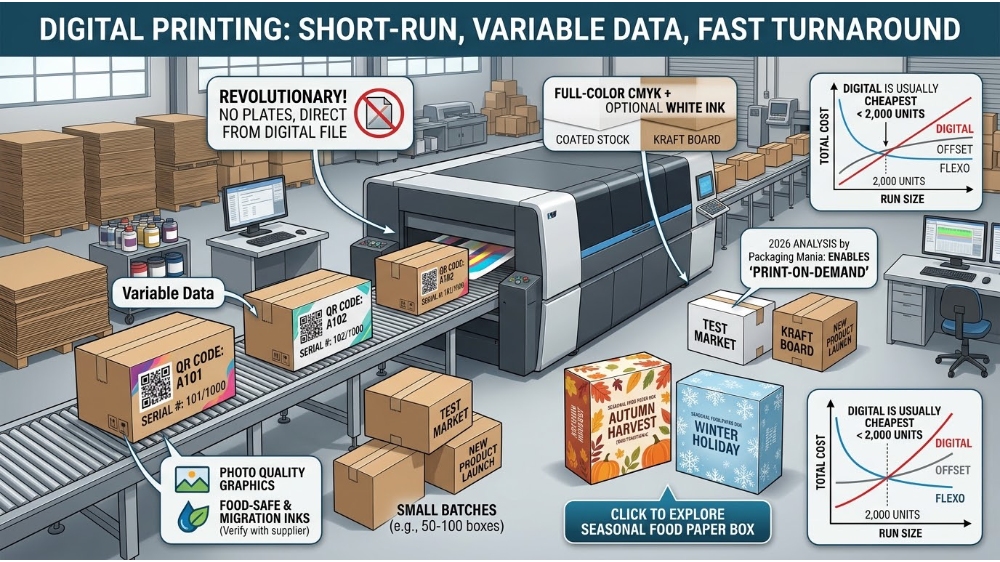
Digital printing has revolutionized custom packaging by removing plates entirely. It works like a large‑format inkjet or toner‑based printer, applying ink directly from a digital file. This eliminates setup time and plate costs, making it the only economical option for small batches—often as low as 50–100 boxes. A 2026 analysis by Packaging Mania highlights that digital printing enables “print‑on‑demand” and variable data (e.g., unique QR codes, serialized numbers) without slowing production.
Digital printers can handle both kraft and white boards, though they perform best on coated stocks. They support full‑color CMYK, plus optional white ink for dark substrates. Photo quality rivals offset, and fine details are excellent. The catch is the per‑unit cost: digital is significantly higher per box than flexo or offset at scale, because there are no economies of plate amortization. For runs under 2,000 units, digital is usually the cheapest total cost; above that, it becomes more expensive than offset or flexo.
Digital printing is ideal for new product launches, seasonal promotions, test markets, or any scenario where you need a small quantity with high‑quality graphics. Many digital inks are food‑safe and low‑migration, but always verify with your supplier. Click to explore seasonal food paper box
CMYK vs. PMS: Choosing the Right Color System
When printing logos, you have two primary color systems: CMYK (Cyan, Magenta, Yellow, Key/Black) and PMS (Pantone Matching System). CMYK is a four‑color process that mixes dots of these inks to create a wide gamut—ideal for photographs and complex gradients. PMS uses pre‑mixed, solid inks that provide exact, consistent color across every box. As YBJ Packaging explains in a 2026 guide, PMS is essential for brand consistency, because CMYK can vary slightly between print runs and substrates.
For food boxes, a logo often uses one to three PMS colors for the core branding, while supporting images or text may be printed in CMYK. Flexo and offset both support PMS, but digital presses typically simulate PMS using CMYK recipes—this can cause slight deviations. If color accuracy is paramount, choose offset or flexo with PMS and request a physical drawdown before production.
Cost‑wise, each PMS color adds an extra plate or ink station, increasing setup and per‑unit costs. CMYK, by contrast, is a fixed four‑color setup regardless of the design complexity. Many food brands limit their box to two or three PMS colors to keep costs manageable while ensuring brand integrity.
Kraft vs. White Paperboard: How Substrate Affects Print
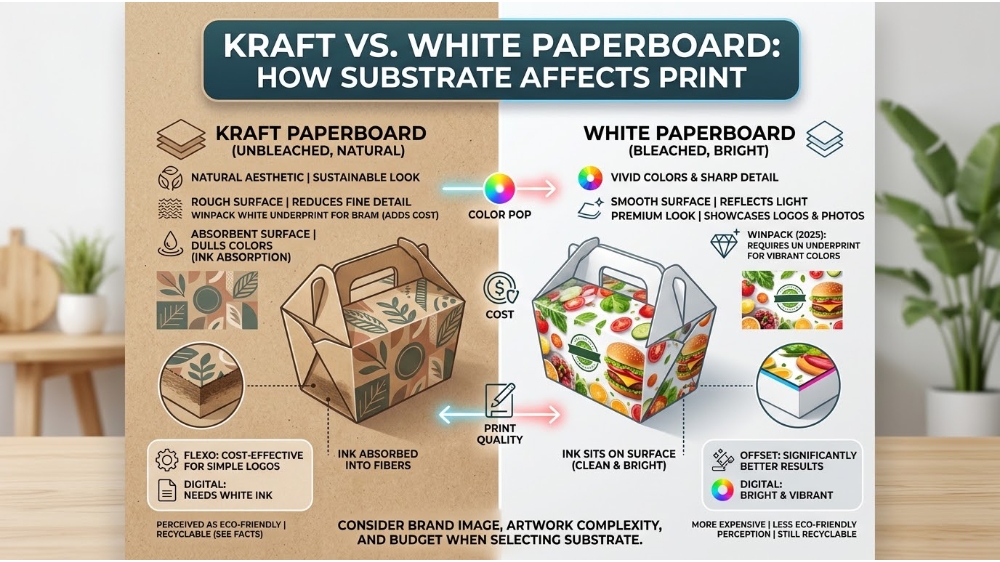
The material you print on is as important as the print method. Kraft paperboard is unbleached, brown, and naturally absorbent. It offers an earthy, sustainable look but presents challenges: the dark background absorbs ink, dulling colors, and the rough surface reduces fine detail. A 2025 article by Winpack notes that printing on kraft often requires an additional white underprint layer to make colors pop, adding cost. Conversely, white paperboard (bleached) has a smooth, bright surface that reflects light, making colors vivid and sharp—ideal for offset and digital printing. Click to explore kraft brown paper box for food packaging
However, white board is more expensive than kraft and is not always perceived as “eco‑friendly” by consumers, though it is still recyclable. Learn more about food paper box recyclability by Are Paper Food Containers Recyclable? Facts & Guide for Foodservice. Many food brands choose kraft for its natural aesthetic, while others use white board to showcase colorful logos and photography. Flexo can print on both, but offset delivers significantly better results on white coated boards. Digital printing works on both, but white ink is often required for kraft.
When selecting substrate, consider your brand image, the complexity of your artwork, and your budget. For a simple one‑ or two‑color logo on kraft, flexo is a classic, cost‑effective choice. For a full‑color photographic design on a premium box, white board with offset or digital is the way to go.
Ink Safety and Food‑Contact Compliance
Food packaging inks must meet strict regulations to prevent migration of harmful substances into food. In Europe, the Good Manufacturing Practice (GMP) for printing inks is governed by the European Food Safety Authority (EFSA), while in the U.S., the FDA has guidelines for indirect food additives. A 2025 industry report by Flint Group confirmed that many modern low‑migration inks are compliant with these standards. However, not all inks are created equal.
Water‑based inks are the safest and most common for food packaging, as they contain minimal volatile organic compounds (VOCs). UV‑cured inks, while durable, require careful formulation to avoid photoinitiators migrating. Solvent‑based inks are rarely used for food contact surfaces. Always specify that your print supplier uses low‑migration inks, and request a certificate of compliance. For digital printing, many toner‑based systems use food‑safe formulations, but check with the manufacturer.
Inks are applied only on the outside of the box, but if the box is folded or stacked, the ink could transfer to the food‑contact side. Therefore, design and handling matter. Work with a packaging partner that understands these nuances and can test for migration if needed.
Artwork Setup: Bleed, Safe Area, Vector vs. Raster
Preparing your artwork correctly is critical for a professional result. Three concepts are essential: bleed, safe area, and file format. Bleed is the portion of the design that extends beyond the cut line—typically 3mm (0.125 inches) on each side—to prevent white edges after trimming. Safe area is the inner margin (usually 5mm) where you place critical elements like logos and text, ensuring they aren’t cut off.
Vector files (e.g., .ai, .eps, .pdf) are preferred because they are resolution‑independent and scale perfectly. Raster images (e.g., .jpg, .png) have a fixed resolution; if they are below 300 DPI at final size, they will appear pixelated. Most printers require vector logos for sharp edges. A 2025 guide from Packifyme emphasizes that vector art is essential for clean, crisp lines on corrugated and paperboard.
Include all fonts, embed images, and provide a clear indication of the die‑cut line if the box has a special shape. Work with your printer early in the design phase to ensure compatibility with their specific printing method—flexo, for example, may require higher‑contrast line art, while digital can handle subtle gradients.
Cost, MOQ, and How to Choose the Right Method
Selecting the best printing method ultimately comes down to three variables: quantity, color complexity, and substrate. The table below summarises the key trade‑offs.
| Method | Best For | Cost Curve | Substrates | Colors | Typical MOQ |
|---|---|---|---|---|---|
| Flexographic | High‑volume, simple logos, uncoated boards | Low per‑unit at scale; high plate cost | Kraft, white board, corrugated | Spot colors (2–6), limited halftones | 10,000+ |
| Offset | Premium quality, large runs, coated boards | Medium per‑unit; high setup cost | Coated white board, smooth surfaces | CMYK + PMS, photo‑quality | 5,000+ |
| Digital | Short runs, variable data, fast turnaround | High per‑unit, no setup cost | Most substrates (with compatible inks) | CMYK + white, photo‑quality | 100+ |
For a small café launching a new fry box with a full‑color logo, digital printing on a short run (500 boxes) is the most practical. A large QSR chain ordering 50,000 pizza boxes will almost certainly choose flexo for cost efficiency. A premium bakery wanting rich, metallic foil‑like effects might combine offset with a spot PMS color.
Don’t forget to ask about plate or setup fees. Some digital providers charge a flat setup fee of $50–$100, while offset may require $500–$1,000 for plates and make‑ready. Flexo plates are expensive but reusable for reorders.
Quick decision matrix:
- Under 2,000 boxes: Digital is usually the cheapest total cost.
- 2,000 – 10,000 boxes: Compare offset vs. digital; offset often wins for large areas of solid color.
- Over 10,000 boxes: Flexo is the most economical, especially on uncoated board.
- Complex photography + white board: Offset offers the best quality.
- Kraft + 1–2 PMS colors: Flexo is the classic, cost‑effective solution.
Always request a printed sample (drawdown) before full production to check color, registration, and ink adhesion. This is especially important when switching methods or substrates.
Frequently Asked Questions
Which printing method is best for small orders (under 500 boxes)?
Digital printing is the clear winner for small orders. It has no plate costs, minimal setup, and can produce high‑quality CMYK prints with variable data, making it economical for batches as low as 50–100 boxes.
Can you print full‑color photos on kraft paper boxes?
Yes, but the dark brown background will mute colors. To achieve vibrant results, a white underprint layer is required, which adds cost. For best photographic results on kraft, use digital printing with white ink or choose a coated white board instead.
What is the minimum order quantity (MOQ) for flexographic printing?
Flexo MOQs typically start at 10,000–20,000 units because the plate cost must be spread over a large volume to make it economical. Some suppliers may offer lower MOQs but at a higher per‑unit price.
Are digital prints food‑safe for direct contact?
Most digital inks used for food packaging are low‑migration and comply with FDA or EFSA standards when applied on the non‑food side. Always request a certificate of compliance and confirm with your supplier that the ink is suitable for your specific application.
Need custom food boxes with the perfect print method?
Whether you need flexo for high volume, offset for premium quality, or digital for short runs, our team can match the right printing technique to your budget, substrate, and timeline. Let’s talk about your next packaging project.
Post time: Aug-18-2026